Showing posts with label Windows. Show all posts

Monday, August 29, 2016

How to Check Your Motherboard Model Number on Your Windows PC

Whether you need to update drivers, want to check hardware compatibility, or you’re just curious, it’s way easier to check your motherboard model number with these simple tricks than it is to crack open your computer case to check the board itself. Read on as we show you how to check your motherboard model number from the comfort of your keyboard.

Why Do I Want To Do This?

There are a variety of situations where knowing your motherboard’s model number is important: upgrading your drivers, buying new hardware (you’ll need the proper expansion slots for card-based upgrades and the right memory DIMMS for memory upgrades, etc.), and checking the capabilities of your board if you’re considering upgrading the entire thing.
If you kept the paperwork that came with your computer (or the individual components if you built it yourself) you can often times reference that. Even then, it’s best to check to make sure the documentation is correct. Rather than open the case and search for the model number, it’s easy to use tools within Windows to check things out.

Checking Your Model Number via CMD.exe

If you’re comfortable using the command line, you can easily check a variety of motherboard and hardware stats using the handy Windows Management Instrumentation Command-line (WMIC) a command-line interface for Microsoft’s powerful WMI tool.

Sunday, June 26, 2016

How to Block Facebook – Youtube and Other sites using L7 (Layer7) - Mikrotik Router

Below i will show you how to block facebook and youtube sites using Mikrotik L7 Protocols (Layer 7). here i use RouterBoardOS RB1100.

STEP 1:
you have to create new Regexp rule at Layer7 Protocols by Press  , and name it as “DENIED” (withoue quote), see details below:
You can Copy & Paste the code above at below:
^.+(facebook.com|youtube).*$
STEP 2:
Now create Filter Rules, as follow:
At General Tabs for Chain, Please Choose : Foward
At Advanced tabs, select ‘DENIED’ (rule that you have
create at step 1) for Layer7 Protocols
Choose Action ‘DROP’
And At last, your Filter rule to block facebook and youtube should have effected to your network.
try to access facebook & youtube, and you will see that the two sites will not able to access.
this can be see from the filter rule you have created, it will catch the bytes for denied sites in your network.

Mikrotik Port Fowarding Tutorial

Mikrotik Port Fowarding - Port Fowarding is one of the features of the mikrotik router (RB450g, RB750g, RB1100Ahx and other mikrotik router series). Port Fowarding on mikrotik router is used to redirects from destination address (external ip address/ ip WAN Public) to source address ( internal ip address / IP LAN) based on port number. This technique is most often used to make a host (such us web server, ftp server, ssh server, personal pc and other network devices)  that is on the internalnetwork can be accessed via the external network (the Internet) and protected without going through adial-up VPN or other type of vpn. 


How to settings or configure port fowarding on web server

Standart ports web server is TCP 80 (http) and 443 (https). Many network devices can be accessed via web based by using port TCP 80 and other port, for example cctv, ip camera, dvr, and other. This example will show you how to foward port web server (tcp 9000) to destination NAT. 107.18.22.12 is the example WAN IP address and 192.168.100.1 is the desired internal destination ip address.

Fowarding port using winbox 

1. Login to mikrotik router using winbox application
2. Go to IP => Firewall => NAT . Add new NAT Rule

Mikrotik Port Fowarding

On General Tab 
Chain = dstnat
Dst. Address = WAN IP Address Mikrotik Router
Protocol = TCP
Dst. Port = 9000 / you can change it.
Mikrotik Port Fowarding

On Tab Action 
Action = dst-nat
To Address = Internal destination ip address (Web Server Ip address)
To Port = default port (for example port 80)

Mikrotik Port Fowarding FTP Server, SSH Server, Mail Server, RDP (Remote Desktop Protocol), and RTSP (Real Time Streaming Protocol).

Default Port List Network Protocol

1. FTP Server = 20 & 21 TCP
2. SSH Server = 22
3. Mail Server = POP3 - port 110, IMAP - port 143, SMTP - port 25, HTTP - port 80, Secure SMTP (SSMTP) - port 465, Secure IMAP (IMAP4-SSL) - port 585, IMAP4 over SSL (IMAPS) - port 993, Secure POP3 (SSL-POP) - port 995
4. RDP (Remote Desktop) =    TCP port 3389 and UDP port 3389
5. RSTP (Real Time Streaming Protocol) = TCP port 554, UDP Port 3389

How to Setup / configure port fowarding on mikrotik router  

On To Port text field, enter default port of network protocol that will be forwarded

Mikrotik Port Fowarding

If the mikrotik port forwarding not working, please disable or change the  ftp port, ssh port , and wwwport on IP Service List ( IP => Services). See the capture below :


Mikrotik Port Fowarding

How to reset to factory default Mikrotik Router

If you messed up with the configuration on your MikroTik routers or RouterOS devices, which you cannot login to the router to manage it any more, you can reset the router to its factory default settings to gain back the access. The administrator account can also be reset with this way.
Please be informed that you will lose all the configuration and any other data on the router after you reset it, please proceed with caution.
Most MikroTik devices are fitted with a reset button. Look for the reset button labeled with “RES” on your MikroTik router.
  1. Turn off the device power.
  2. Hold the reset button and do not release.
  3. Turn on the device power and wait until the USER LED labeled with “ACT” starts flashing.
  4. Now release the button to clear configuration.
  5. Wait for a few minutes for the router to clear and restore the factory settings.
If you release the reset button after the LED stops flashing, you have to redo everything again.
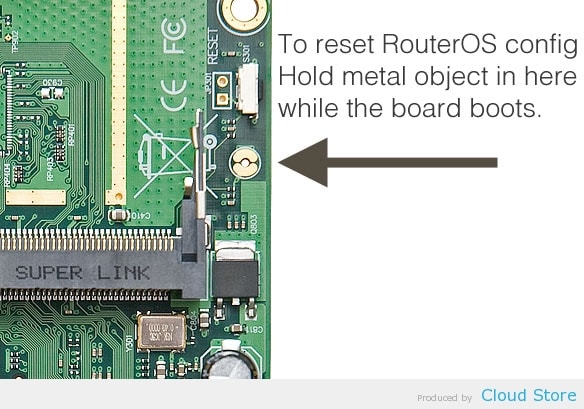
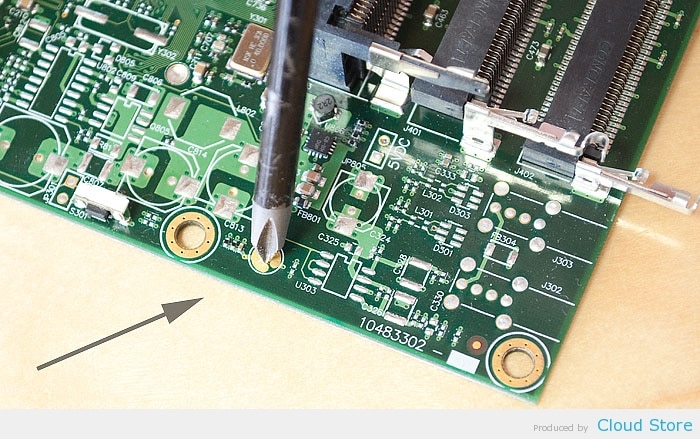
Other than the reset button, you can also reset the device with jumper hole. Almost all MikroTik models are fitted with a reset jumper hole. Some might need opening of enclosure, RB750/RB951/RB751 have the jumper hole under one of the rubber feet of the enclosure.
Close the jumper with a metal screwdriver, and boot the board until the configuration is cleared.

Monday, September 8, 2014

How to type Khmer Unicode ver1_km

យូនីកូត​គឺ​ជា​គ្រោង​ការណ៍​បម្លែង​កូដ​ជា​អក្សរ​សកល​សម្រាប់​វាយ​អក្សរ និង​អត្ថបទ​ដែល​កំណត់​នូវ​វីធី​ជាប់​លាប់​នៃ​ការ​បម្លែង​កូដ ប្រើ​បាន​ច្រើន​ភាសារ ដែល​អាច​ផ្លាស់​ប្តូរ​ទិន្នន័យ​អត្ថបទ ជា​អន្តរជាតិ និង​បង្កើត​មូលដ្ឋាន​គ្រិះ​សំរាប់​ផ្នែក​ទន់​ជា​សកល។
How to use Khmer Unicode by Nida: https://www.dropbox.com/s/64fbdpopy4z6185/How_to_type_Khmer_Unicode_ver1_1km.pdf?dl=0

Khmer Unicode Keyboard (Nida):
https://www.dropbox.com/s/smgve75v39nku7p/KhmerUnicodeKeyboardLayout.pdf?dl=0

Khmer Unicode Keyboard (Windows):
https://www.dropbox.com/s/3g5rxj40mh02oqz/keyboard-Windows.pdf?dl=0

Khmer Unicode Typing: https://www.dropbox.com/s/727az6vo69p13bc/KhmerUnicodeTyping1.6.0.exe?dl=0

Sunday, March 30, 2014

The wizard was interrupted before Symantec Endpoint Protection could be completely installed

Common Error for Symantec Endpoint V 11.5:

1) The wizard interrupted before Symantec Endpoint Protection could be completely installed2) Error: LiveUpdate could not access its settings. Error Code: 0x00000000

Solution

1. A clean install of the latest compatible release of LiveUpdate often resolves this issue.

Uninstall Symantec LiveUpdate with Add/Remove Programs
Change the following registry key:

Tuesday, March 11, 2014

How to Convert Excel Numeric Cell Value into Words

There is no built-in formula in excel, you have to add a vb script and permanently save it with your MS. Excel's installation as Add-In.
Step1: press Alt+F11 Step2: MENU: (Tool Strip) Insert Module Step3: copy and paste the below code

Saturday, January 25, 2014

Windows system assessment tool has stopped working Win 7

How to solve Windows system assessment tool has stopped working Win 7 when running rating
Sometimes it's cache gets bugged, and will not provide a rating. Try this - (copied from another site)
Go to Start menu and find Command Prompt in Accessories.

Thursday, December 19, 2013

Installation fails with the message "Pending system changes that require a reboot have been detected"

Issue


Why does Symantec Endpoint Protection (SEP) 11.x / 12.1 fail to install when there are pending file rename operations on a computer?

Symptoms
This issue has been reported on several systems with differing specifications and configurations. Below is a list of the commonalities between systems exhibiting this issue:
  • The system is running Windows XP SP 3 or later, Windows Vista RTM or later, or Windows 2008 RTM or later.
  • An application or driver was installed or uninstalled previously to SEP which requires a reboot to complete some actions.
  • A reboot may or may not have been performed between the previous install/uninstall and the SEP installation attempt.
  • The installation attempt of SEP 11 fails with the message "Pending system changes that require a reboot have been detected".

Sunday, December 15, 2013

Clean Install Instructions for Windows® 7 Sony Vaio (R)

This document provides the steps and information necessary to perform a Clean Install of the Microsoft® Windows® 7 operating system on applicable VAIO® computer models. This process will take 1 - 2 hours to complete.Windows 7 Logo
A Clean Install formats the hard drive before installing the operating system. All user data, files, and settings are erased and a new copy of the operating system is installed. A data backup (to an external drive or media, such as a flash drive or DVD) will be required to save desired files, such as documents, music and pictures. Existing software on your computer will also be lost and need to be reinstalled.

The installed battery may not be properly connected to the computer Sony Vaio(R)

I was geting this annoying message and system was going into hibernate mode.

"The installed battery may not be properly connected to the computer or may not be compatible with the computer.
Click "OK" to enter Hibernate mode,and remove and reinsert the battery. See the VAIO(R) User Guide for more information about using the battery."

Monday, December 2, 2013

AtBroker.exe error when attempting a remote connection to your desktop computer

There is a known Windows 7 bug that you may run in to when attempting to remotely connect to your desktop computer. After you type in your password, you may see a screen that is completely black except for the following dialog box:


Tuesday, November 5, 2013

How to Fix External/Flash Drive Folders Changed to Shortcuts Virus

How to Fix External/Flash Drive Folders Changed to Shortcuts Virus

Some Viruses changes our files on our Flash Drive or External Hard Drive changed into Shortcuts. We can’t open the files from our Pen/Thumb drives. Many people are getting this Virus from their Work Place and Losing their Data. How do i get my files back so that I can view them? Most viruses delete the “Folder options” menu and “Task Manager” as well.

How to fix Bootmgr is compressed in Windows 7

How to fix Bootmgr is compressed in Windows 7 ?

ERROR:
Bootmgr is compressed
Press Ctrl+Alt+Del to continue

How to Run Multiple Yahoo! Messengers and Login to Multi Y!M Accounts


If you prefer to edit and change the registry setting yourself manually, without using the above registry registration file, simply launch the registry editor (type regedit at Run command), and navigate to the following registry branch:

How can I run multiple Skype accounts on Windows desktop?

To use more than one Skype account on the same computer at the same time, you need to start a new instance of Skype.
  1. From the Windows taskbar, click Start > Run (or press the Windows The Windows key. and R keys on your keyboard at the same time).